# Missing Menubar in Servoy 4.1.0b4 Client on Mac
**URL:** https://forum.servoy.com/t/missing-menubar-in-servoy-4-1-0b4-client-on-mac/9809
**Category:** Classic Servoy
**Created:** [October 30, 2008, 6:12pm UTC](https://forum.servoy.com/t/missing-menubar-in-servoy-4-1-0b4-client-on-mac/9809 "2008-10-30T18:12:29Z")
**Posts on this page:** 12
**Page:** 1
### Author:  [@SteveInLA](https://forum.servoy.com/u/SteveInLA)
#### Post date: [October 30, 2008, 6:12pm UTC](https://forum.servoy.com/t/missing-menubar-in-servoy-4-1-0b4-client-on-mac/9809/1 "2008-10-30T18:12:29Z")
I am trying to change the Look & Feel for a solution using Servoy 4.1.0 beta 4 on a Mac running OS 10.4.11. Launching the Smart Client from within Developer works, but I am missing all items except “Servoy Eclipse” from the menubar while the Smart Client is active. Since the “Edit” menu is missing, I am unable to set the Look & Feel for the solution, and since I am running on the Mac and currently do not own any client licenses for Servoy 4, I am unable to launch the Smart client any other way than through Developer. How do I change the solution’s Look & Feel?
Steve In LA
---
### Author:  [@gerzse](https://forum.servoy.com/u/gerzse)
#### Post date: [November 3, 2008, 6:03pm UTC](https://forum.servoy.com/t/missing-menubar-in-servoy-4-1-0b4-client-on-mac/9809/2 "2008-11-03T18:03:09Z")
On MacOS, if you launch Servoy Client from the Developer, you should see the Edit menu inside the Servoy Client window (like on MS Windows), not on the main MacOS menubar.
---
### Author:  [@SteveInLA](https://forum.servoy.com/u/SteveInLA)
#### Post date: [November 3, 2008, 6:38pm UTC](https://forum.servoy.com/t/missing-menubar-in-servoy-4-1-0b4-client-on-mac/9809/3 "2008-11-03T18:38:57Z")
I know I should see the Edit menu, but I don’t. That is the problem.
---
### Author:  [@lvostinar](https://forum.servoy.com/u/lvostinar)
#### Post date: [November 4, 2008, 9:20am UTC](https://forum.servoy.com/t/missing-menubar-in-servoy-4-1-0b4-client-on-mac/9809/4 "2008-11-04T09:20:27Z")
The Edit option is not in MAC menubar (so not where ServoyEclipse option is) but in client menubar. What options do you have in client menubar ?
---
### Author:  [@pbakker](https://forum.servoy.com/u/pbakker)
#### Post date: [November 4, 2008, 10:50am UTC](https://forum.servoy.com/t/missing-menubar-in-servoy-4-1-0b4-client-on-mac/9809/5 "2008-11-04T10:50:16Z")
Hi Steve,
Maybe you can post a screenshot of the issue?
Paul
---
### Author:  [@SteveInLA](https://forum.servoy.com/u/SteveInLA)
#### Post date: [November 5, 2008, 12:44am UTC](https://forum.servoy.com/t/missing-menubar-in-servoy-4-1-0b4-client-on-mac/9809/6 "2008-11-05T00:44:56Z")
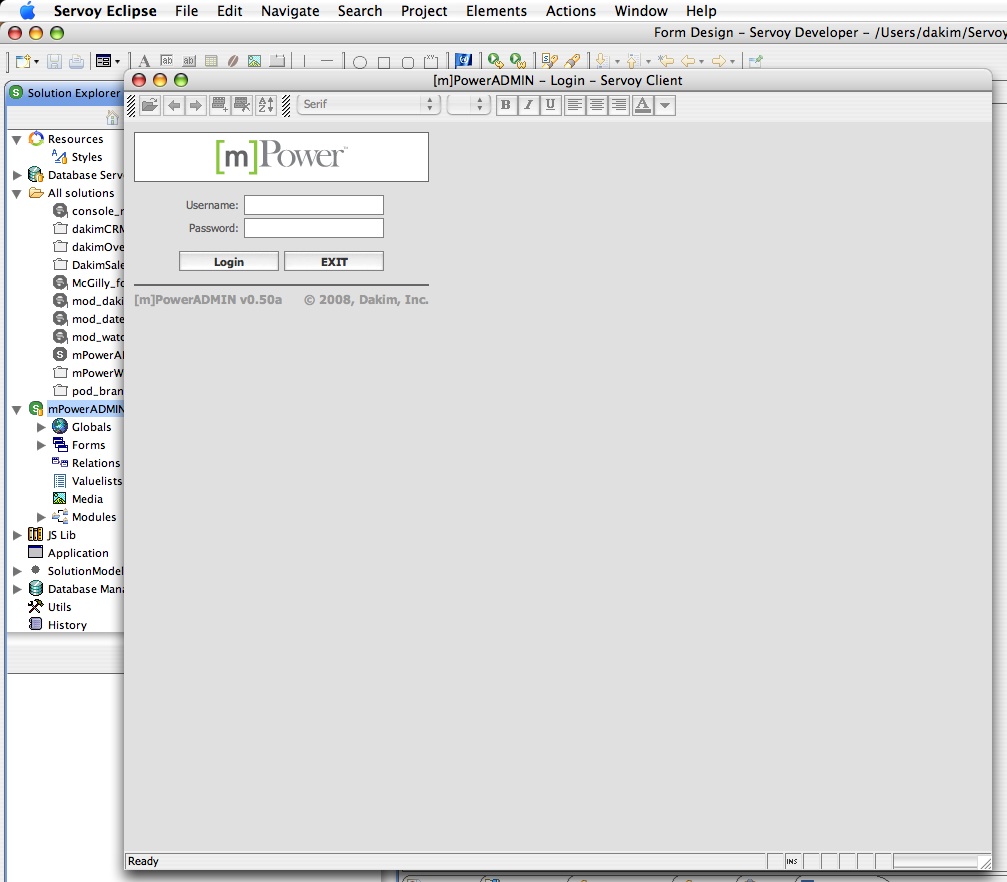
The choices in the top menubar are for Eclipse. There is no menubar in the client window.
[attachment=0]no\_menu.jpg[/attachment]
---
### Author:  [@rgansevles](https://forum.servoy.com/u/rgansevles)
#### Post date: [November 11, 2008, 3:29pm UTC](https://forum.servoy.com/t/missing-menubar-in-servoy-4-1-0b4-client-on-mac/9809/7 "2008-11-11T15:29:59Z")
Steve,
We could not reproduce this.
Which OS and java versions do you use?
Can you try with the latest 4.1b6 as well?
> How do I change the solution’s Look & Feel?
Note that on the mac the only Look&Feel that works is the default one, you can change the default font size though.
Rob
---
### Author:  [@SteveInLA](https://forum.servoy.com/u/SteveInLA)
#### Post date: [November 11, 2008, 8:19pm UTC](https://forum.servoy.com/t/missing-menubar-in-servoy-4-1-0b4-client-on-mac/9809/8 "2008-11-11T20:19:02Z")
I am using Mac OS 10.4.11 and Java 1.5.0\_16-132. This is still a problem even after upgrading to Servoy 4.1.0 Beta 6.
> Note that on the mac the only Look&Feel that works is the default one, you can change the default font size though.
Rob, let me see if I am understanding you correctly. I interpret this as you telling me that even though my Smart Client solutions will run on both the Mac and Windows platforms, from now on they will look completely different, and that the solution that I have been developing for the past three and a half years using the Metal Look & Feel will have to be redesigned if it is to be usable on the Mac, since the default Look & Feel for the Mac OS is dramatically different than the Metal Look & Feel. Have I heard you right? For someone like myself with a lot of time and money wrapped up in Servoy, this is a pretty ominous statement.
---
### Author:  [@IT2Be](https://forum.servoy.com/u/IT2Be)
#### Post date: [November 11, 2008, 9:08pm UTC](https://forum.servoy.com/t/missing-menubar-in-servoy-4-1-0b4-client-on-mac/9809/9 "2008-11-11T21:08:28Z")
I don’t have this issue with the default laf.
Steve, before you proceed that discussion with Rob (  ) can you test if if works with the default laf so that can be excluded…
---
### Author:  [@rgansevles](https://forum.servoy.com/u/rgansevles)
#### Post date: [November 12, 2008, 8:29am UTC](https://forum.servoy.com/t/missing-menubar-in-servoy-4-1-0b4-client-on-mac/9809/10 "2008-11-12T08:29:06Z")
Steve,
Unfortunately, the java implementation on MacOS X does not work fully with other Look&Feel implementation than the default one.
This is a limitation in java on MacOs that cannot be fixed in Servoy.
Rob
---
### Author:  [@Harjo](https://forum.servoy.com/u/Harjo)
#### Post date: [November 12, 2008, 1:20pm UTC](https://forum.servoy.com/t/missing-menubar-in-servoy-4-1-0b4-client-on-mac/9809/11 "2008-11-12T13:20:31Z")
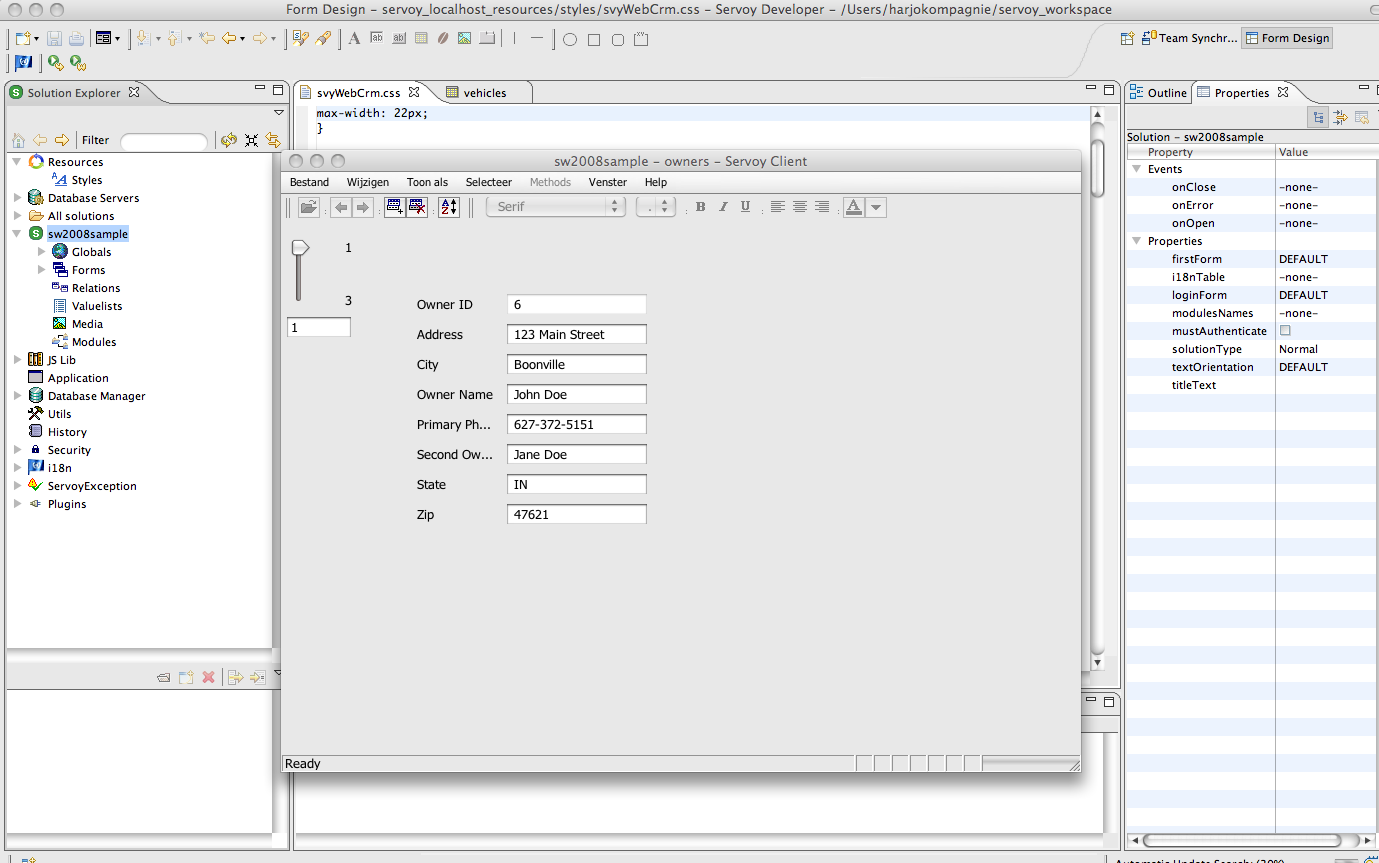
I have this with Apple OSX, when I launch a client from the developer and default L&F
the menu bar appears ’ the windows’ way
( I can nicely change the default L&F to Metal L&F)
---
### Author:  [@SteveInLA](https://forum.servoy.com/u/SteveInLA)
#### Post date: [November 13, 2008, 5:39pm UTC](https://forum.servoy.com/t/missing-menubar-in-servoy-4-1-0b4-client-on-mac/9809/12 "2008-11-13T17:39:39Z")
This continues to be a problem for me even after several clean installations of Servoy 4.1.0 Beta 6. I have filed a support case.