Robert Huber:
Hi
I tried to use the Edit date format property. When I enter a format, let’s say dd.MM.yyyy in Display Format AND Edit Format and apply the checkbox “Use as mask” and enter a dot (.) the Edit Format gets lost.
In the field only … are displayed, as the edit format got lost.
currently if you use a mask then you cant have edit and display formats, thats not supported.
With a mask you can only have one format that is both display and format at the same time.
In the dialog of the date format property you should also see this, because when you select the mask you will see that the edit format text box will be disabled (and the place holder enabled)
Hi Paul,
To eliminate the problem of the export itself I created a new export from Servoy 3 and imported it into Servoy 5.1 and it worked! All links to the media of attached modules are preserved like they should. So problem solved!
Thanks for your help…
Hi
Ok, the date mask would be a fine thing, but I would like to show a date like it is used for german speaking countries, like 15.01.2010. I have to enter in the Display format field: dd.MM.yyyy of Servoy’s Edit date format property form. I would like to show to the user a format like tt.mm.jjjj (for Tag, Monat, Jahr). I can’t do that, because the format needs to be in the english version of dd.MM.yyyy, but then this format is NOT i18n aware. So the user get’s to see dd.MM.yyyy in the field (see attached file) but would like to see tt.mm.jjjj. So the only solution would be make the format either i18n aware or may be you have another idea how to accomplish that?
Best regards, Robert
PS: You would make your german speaking customers make happy if you’d offer a format in the Display Format combobox of dd.MM.yyyy 
jcompagner:
Robert Huber:
Hi
I tried to use the Edit date format property. When I enter a format, let’s say dd.MM.yyyy in Display Format AND Edit Format and apply the checkbox “Use as mask” and enter a dot (.) the Edit Format gets lost.
In the field only … are displayed, as the edit format got lost.
currently if you use a mask then you cant have edit and display formats, thats not supported.
With a mask you can only have one format that is both display and format at the same time.
In the dialog of the date format property you should also see this, because when you select the mask you will see that the edit format text box will be disabled (and the place holder enabled)
Hi Servoyans
The table events after… sounds good. I am wondering how/where do I get a handle to a deleted record? If I don’t get a handle, how do I know which one was deleted?
Best regards, Robert
BTW, wouldn’t a name like for example postRecordUpdate be a bit more common? Then the other table events could be called preRecordUpdate what they really are, aren’t they? 
Robert Huber:
Ok, the date mask would be a fine thing, but I would like to show a date like it is used for german speaking countries, like 15.01.2010. I have to enter in the Display format field: dd.MM.yyyy of Servoy’s Edit date format property form. I would like to show to the user a format like tt.mm.jjjj (for Tag, Monat, Jahr). I can’t do that, because the format needs to be in the english version of dd.MM.yyyy, but then this format is NOT i18n aware. So the user get’s to see dd.MM.yyyy in the field (see attached file) but would like to see tt.mm.jjjj. So the only solution would be make the format either i18n aware or may be you have another idea how to accomplish that?
Problem is that you see the display format as something that you want to show when there is a null value (also when in edit mode)
But thats not what display format is, display format shows the date in a completely different kind of format for example:
15 may 2009 is displayed when not editing but 15-05-2009 is shown when you place the cursor in.
Currently thats not supported when using masks.
But what you want is even different, because you really want to show ‘tt.mm.jjjj’ when editing but the format that we parse has then to be ‘dd.MM.yyyy’ thats even different thats not the display format at all.
You will for example never see in the user interface the format string of the display format. Thats purely used if there is a value that you dont edit.
what you want is an option or something that you can say, show localized edit format.
Dont know how easy this would be to have (in smart and webclient)
Please make a case so that we can track this.
Robert Huber:
PS: You would make your german speaking customers make happy if you’d offer a format in the Display Format combobox of dd.MM.yyyy 
i added it to the format combo options.
We could add a few more examples in that list. So if you anybody has some that they would like to see i can add them.
What i want to do is that that drop down remembers your last 10 choices… so that you fill it yourself.
jcompagner:
Problem is that you see the display format as something that you want to show when there is a null value (also when in edit mode)
But thats not what display format is, display format shows the date in a completely different kind of format for example:
15 may 2009 is displayed when not editing but 15-05-2009 is shown when you place the cursor in.
Currently thats not supported when using masks.
But what you want is even different, because you really want to show ‘tt.mm.jjjj’ when editing but the format that we parse has then to be ‘dd.MM.yyyy’ thats even different thats not the display format at all.
You will for example never see in the user interface the format string of the display format. Thats purely used if there is a value that you dont edit.
what you want is an option or something that you can say, show localized edit format.
Dont know how easy this would be to have (in smart and webclient)
Please make a case so that we can track this.
Yes, what you write is what I mean, thanks Johann, made a request for the localized edit format in the support system, Case ID = 274638.
jcompagner:
Robert Huber:
PS: You would make your german speaking customers make happy if you’d offer a format in the Display Format combobox of dd.MM.yyyy 
i added it to the format combo options.
We could add a few more examples in that list. So if you anybody has some that they would like to see i can add them.
What i want to do is that that drop down remembers your last 10 choices… so that you fill it yourself.
Again thanks, very kind, regards, Robert
Hi
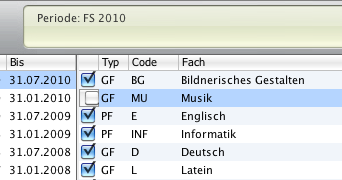
May be not related to this release only, we have a weird behaviour of checkboxes when clicking a checkbox in a table view forms - it moves to the right. See attached screenshot. The style sheet is defined as follows:
check
{
font: 11pt LucidaGrande;
text-align: left;
margin: 0px 0px 0px 0px;
border-style: empty;
}
This appens in Client and the Client started from Developer as well.
Do other have this behaviour as well? It is very reproducable here.
Regards, Robert
if it still happens in the 5.1 final then please make a case