IT2Be:
I lean towards the conclusion that when you use the first the second is not needed.
For what transactions are mostly used for in Servoy is to be able to undo all changes by a user. With version 3.0 you can disable autosave and discard any changes made without using (database) transactions.
But when you execute the saveData function you might still use transactions because some database constraints may cause the save to fail partially. In that case you do want to rollback your data in your database.
chartpacs:
Another question: will Servoy grab the next primary key even though I’m not using the saveData command until the end? I think someone earlier in the thread mentioned “temporary” keys. Is that the same thing?
Jan Blok told me at SW06 that Servoy uses temporary keys to manage any related data in memory before you save it to the database.
So Servoy won’t fetch a new PK from the database until you save the data to the database.
ROCLASI:
Jan Blok told me at SW06 that Servoy uses temporary keys to manage any related data in memory before you save it to the database. So Servoy won’t fetch a new PK from the database until you save the data to the database.
Hi Robert, that’s even better because that avoids “holes” in the pk sequence (if it’s important to you that pks don’t skip). Thanks for the info.
I also struggle with this question but heard here some good arguments when to use db sequences instead of Servoy managed sequences.
I see there are also advantages of using Servoy sequences, e. g. a certain independency of the db, if one has a pure Servoy application, ease of use within Servoy Developer, …
Did anyone encounter problems in real applications with Servoy sequences except the case where certain restrictions apply to a developed application as mentioned in thread, i. e. table also used by other programs then Servoy etc.
Best regards, Robert
IT2Be:
As in the header, who uses either one or the other and what was/were the reason(s)?
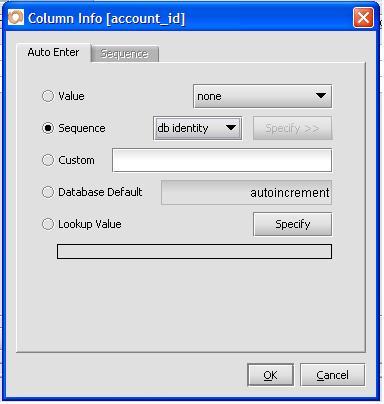
I see there is a new option in Servoy V3 in the AutoEnter/Sequence properties dialog. In addition to DB Identity in the Sequence option, there’s Database Default (4th radio button), which in this example is autoincrement as that’s what’s now set in the DB. I can’t find any reference to this in the Servoy 3 docs - the screen shot on pg 143 of the Servoy 3 Dev Users Guide is different to the one shown below.
There’s an empirical difference - sequencing works if Sequence to DB Identity is set, while selecting Database Default - autoincrement doesn’t sequence.
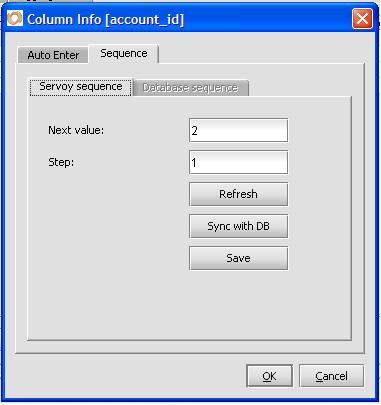
While looking at this, I also notice that on the sequence tab the database sequence tab is never enabled. See the screen shot. I haven’t found the combination that lets me in.
Can anyone explain please?
FWIW, here’s a script I used to change all the DB identities to autoincrement - needed it as I had to upgrade a few sites. It’s for Sybase, might need editing for other flavours of SQL
var servername = "user_data"
var tablename = ""
var PKcolumnname = ""
var SQLcmd = ""
var AllTables = databaseManager.getTableNames(servername) // get an array of table names on this server
for ( var i = 0 ; i < AllTables.length ; i++ )
{
	tablename = AllTables[i]
	var jstable = databaseManager.getTable(servername,tablename); // put the column names into a js table
	var PKlist = jstable.getRowIdentifierColumnNames() // get an array of PK column names (usually only 1)

	for ( var j = 0 ; j < PKlist.length ; j++ )
	{
		var PKcolumnname = PKlist[j]
		SQLcmd =  "ALTER TABLE " + tablename + " MODIFY " + PKcolumnname + " DEFAULT AUTOINCREMENT";
		var done = plugins.rawSQL.executeSQL(servername, "", SQLcmd);
		application.output(PKlist.length + " " + done + " " + SQLcmd) // output includes the number of PKs found
		if (done)
		{
			plugins.rawSQL.flushAllClientsCache(servername, tablename)
		}
		else
		{
			plugins.dialogs.showInfoDialog( "Problem",  "Error with " + servername + " " + tablename + " " + PKcolumnname,  "OK")
		}

	}
}
plugins.dialogs.showInfoDialog( "Done!",  servername + ".db " + AllTables.length + " tables' PKs updated to auto-increment",  "OK")
antonio:
While looking at this, I also notice that on the sequence tab the database sequence tab is never enabled. See the screen shot. I haven’t found the combination that lets me in.
Can anyone explain please?
The database sequence tab will only enable when you use database sequences (db seq). In this tab you set the name of the database sequence in the database.
I may have been a bit hasty with the tip. Since changing all the tables to db identity (autoincrement) in both Servoy and Sybase, my solution is broken.
If I open the solution (or exit the editor) with any existing form I get the error “Could not retrieve form data” even on a dummy form with no fields displayed. The odd thing is that after accepting the error message, the form loads ok and the software functions as expected.
Any new form (created since changing the sequences) does not produce this error. I’d be very grateful for your insights.
java.lang.StringIndexOutOfBoundsException: String index out of range: -2
     at java.lang.StringBuffer.charAt(Unknown Source)
     at com.servoy.j2db.dataprocessing.r.a(Unknown Source)
     at com.servoy.j2db.dataprocessing.r.a(Unknown Source)
     at com.servoy.j2db.dataprocessing.r.if(Unknown Source)
     at com.servoy.j2db.dataprocessing.aj.getSharedFoundSet(Unknown Source)
     at com.servoy.j2db.dataprocessing.aj.do(Unknown Source)
     at com.servoy.j2db.dataprocessing.aj.if(Unknown Source)
     at com.servoy.j2db.FormController.a(Unknown Source)
     at com.servoy.j2db.FormController.new(Unknown Source)
     at com.servoy.j2db.FormManager.int(Unknown Source)
     at com.servoy.j2db.FormManager.a(Unknown Source)
     at com.servoy.j2db.FormManager.do(Unknown Source)
     at com.servoy.j2db.develop.ae.do(Unknown Source)
     at com.servoy.j2db.FormManager.a(Unknown Source)
     at com.servoy.j2db.j.a(Unknown Source)
     at com.servoy.j2db.FormManager.propertyChange(Unknown Source)
     at com.servoy.j2db.develop.ae.propertyChange(Unknown Source)
     at java.beans.PropertyChangeSupport.firePropertyChange(Unknown Source)
     at java.beans.PropertyChangeSupport.firePropertyChange(Unknown Source)
     at com.servoy.j2db.J2DBGlobals.firePropertyChange(Unknown Source)
     at com.servoy.j2db.b.setMode(Unknown Source)
     at com.servoy.j2db.develop.c.ax$1.run(Unknown Source)
     at java.awt.event.InvocationEvent.dispatch(Unknown Source)
     at java.awt.EventQueue.dispatchEvent(Unknown Source)
     at java.awt.EventDispatchThread.pumpOneEventForHierarchy(Unknown Source)
     at java.awt.EventDispatchThread.pumpEventsForHierarchy(Unknown Source)
     at java.awt.EventDispatchThread.pumpEvents(Unknown Source)
     at java.awt.EventDispatchThread.pumpEvents(Unknown Source)
     at java.awt.EventDispatchThread.run(Unknown Source)
ROCLASI:
The database sequence tab will only enable when you use database sequences (db seq). In this tab you set the name of the database sequence in the database.
When I set db seq it’s not possible to get to this sequence tab at all - See screenshot seq1 above. Perhaps it depends on what you server is? Mine’s Sybase.
A PS - dropping all the db keys and reverting to servoy sequences fixed the problem. Does this mean that we have to choose between servoy or db sequences before creating forms? Or have I blown something along the way… The results of the rawSQL I used to set the db autoincrement looked fine from Sybase Central, exaclty like ones I’d changed manually. I need to ponder this some more…
ROCLASI:
The database sequence tab will only enable when you use database sequences (db seq). In this tab you set the name of the database sequence in the database.
When I set db seq it’s not possible to get to this sequence tab at all - See screenshot seq1 above. Perhaps it depends on what you server is? Mine’s Sybase.
With me it does enable when I select db seq. I use PostgreSQL.
Antonio, old topic here, but did you ever get this problem fixed?
I too have a project, that needs to be changed from servoy sequences to db sequences on sybase (autoincrement)
I just want to be sure, that after I run your example method, Servoy will work!