\
**Category:** Classic Servoy\
**Created:** [April 6, 2011, 7:37am UTC](https://forum.servoy.com/t/width-of-html-areas/13822 "2011-04-06T07:37:18Z")\
**Posts on this page:** 9\
**Page:** 1
**Author:**  [@Bonkie](https://forum.servoy.com/u/Bonkie)\
**Post date:** [April 6, 2011, 7:37am UTC](https://forum.servoy.com/t/width-of-html-areas/13822/1 "2011-04-06T07:37:18Z")
There is a difference between the web-client and the smart-client when using HTML Areas.
This is what I’ve got in servoy:
a HTML field with the size: 260,20, so far so good… The datasource of this HTML area is a calculation which returns a HMTL with a DIV
```auto
```
But now we have the problem!
In smartclient it shows a scrollbar:
[attachment=1]Screen shot 2011-04-06 at 09.24.09.png[/attachment]
And in the webclient is just works as it should be!
[attachment=0]Screen shot 2011-04-06 at 09.24.18.png[/attachment]
To fix it in the smartclient i have to reduce the width (in the DIV) to 195px and the height to 14px, this is very strange, isnt it? Or just do a dirty work-around, and disable the scrollbars!


---
**Author:**  [@jcompagner](https://forum.servoy.com/u/jcompagner)\
**Post date:** [April 6, 2011, 9:25am UTC](https://forum.servoy.com/t/width-of-html-areas/13822/2 "2011-04-06T09:25:18Z")
and if you configure the html area to never have scrollbars?
Or are the scrollbars really inside the html? Then you must make sure that the style you use in html sets the scrollbar policy
---
**Author:**  [@Bonkie](https://forum.servoy.com/u/Bonkie)\
**Post date:** [April 6, 2011, 12:37pm UTC](https://forum.servoy.com/t/width-of-html-areas/13822/3 "2011-04-06T12:37:33Z")
If I disable the scrollbars on the element its gone, however the problem still is, that I CANNOT use the 260px width in HTML without a scrollbar in the element which is not a expected behavior !!! As you can see at the screenshots in my first post. This only happens in the smartclient!
---
**Author:**  [@jcompagner](https://forum.servoy.com/u/jcompagner)\
**Post date:** [April 6, 2011, 1:06pm UTC](https://forum.servoy.com/t/width-of-html-areas/13822/4 "2011-04-06T13:06:50Z")
i don’t get it now you do say “if i disable the scrollbars then it is gone”
so if it is gone what is then still the problem?
---
**Author:**  [@ROCLASI](https://forum.servoy.com/u/ROCLASI)\
**Post date:** [April 6, 2011, 1:09pm UTC](https://forum.servoy.com/t/width-of-html-areas/13822/5 "2011-04-06T13:09:38Z")
Hi Rick,
It seems the problem is not the width, but the height.
When I use a HTML\_AREA field with an empty border (having a border will reduce the width/height as well) then the 200px width fits perfectly inside the 200px wide field. But I have to reduce the DIV height to 16px to make it fit inside the 20px high field. So it looses 4 pixels somewhere.
Adding a border will require you to tweak with the DIV width/height as well in ways that are unexpected (reduce 1 or 3 pixels for instance…instead of the expected 2 or 4).
I did my testing on Mac.
---
**Author:**  [@Bonkie](https://forum.servoy.com/u/Bonkie)\
**Post date:** [April 6, 2011, 1:35pm UTC](https://forum.servoy.com/t/width-of-html-areas/13822/6 "2011-04-06T13:35:27Z")
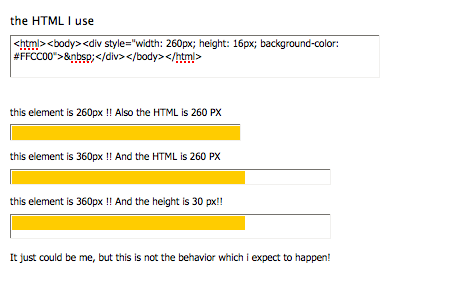
@jcompagner & @ROCLASI: see sample, i just cant express it in words… So I made a solution!
Smartclient:
[attachment=2]Screen shot 2011-04-06 at 15.23.53.png[/attachment]
Webclient
[attachment=1]Screen shot 2011-04-06 at 15.23.55.png[/attachment]
Sample
[attachment=0]rep\_div\_width\_prob.servoy[/attachment]
[rep\_div\_width\_prob.servoy](https://forum.servoy.com/uploads/short-url/2H6MjhQf4PXyOtv4MUlk67hec84.servoy) (3.95 KB)

---
**Author:**  [@jcompagner](https://forum.servoy.com/u/jcompagner)\
**Post date:** [April 7, 2011, 9:51am UTC](https://forum.servoy.com/t/width-of-html-areas/13822/7 "2011-04-07T09:51:21Z")
it seems that it is a mixup between pixels and points…
if you make it 260pt then it is 260 pixels in the smart client (but 360 or something in the web)
can you create a case with this sample? I don’t know if we do something or if it is the java renderer itself
---
**Author:**  [@Bonkie](https://forum.servoy.com/u/Bonkie)\
**Post date:** [April 8, 2011, 8:10am UTC](https://forum.servoy.com/t/width-of-html-areas/13822/8 "2011-04-08T08:10:34Z")
@jcompagner ok filed it under caseid: #374263
---
**Author:**  [@Bonkie](https://forum.servoy.com/u/Bonkie)\
**Post date:** [April 14, 2011, 12:39pm UTC](https://forum.servoy.com/t/width-of-html-areas/13822/9 "2011-04-14T12:39:34Z")
Ok Johan,
Found out that this not only occurs with HTML-areas… Also in the CSS of Servoy.
I have the following CSS:
```auto
field
{
background-color: #F5F5F5; /* E1E1E1 */
border-style: solid;
border-width:0px;
font: 9px "Verdana";
text-align: left;
margin: 1px 2px 1px 1px;
border-color: #CCCCCC; /*60696E */
}
```
Normally 9px is pretty small in HTML but in Servoy its very huge… When I use 9pt is smaller which not should be…
You can try this in a HTML, and you will see what happens:
```auto
Dit is een test tekst (9px)
Dit is een test tekst (9pt)
```
Also included screenshots:
[attachment=1]Screen shot 2011-04-14 at 13.32.09.png[/attachment]
[attachment=0]Screen shot 2011-04-14 at 13.32.30.png[/attachment]
I guess that the PX and the PT are mixed up in the smartclient or something!

