Combo Boxes Displaying Data from Matching Table

Hi guys, Im wondering if someone can walk me through this.

Ive got a simple form with four combo boxes. To feed data into these boxes, I have three related tables.

  1. Area A table containing an area_id and an area_desc
  2. Faculty_Area A table containing area_id faculty_id and an order_id
  3. Faculty A table containing faculty_id and other faculty information.

I want to link faculty_id between tables 2 and 3, and area_id between tables 1 and 2.

In this form, I want to display the Areas (in this case, research area) that a certain faculty member belongs to. Some faculty, however, belong to as many as 4 research areas. Id also like to do this in combo boxes.

The problem Im running into is: When I view the form, all the combo boxes display the same set of data (i.e. Research Area 1 in all four combo boxes), as opposed to the other research areas they belong to (i.e. Research Area 2 in box 2, and so on.)

Ive tried setting up a value-list for each combo box and setting up multiple relationships within those value-lists but that doesnt seem to work.

Thanks in advance!
Mike

Hello Mike,

Did you try using “application.setValueListItems”
With this function you can control everything in your valuelist,
including dependencies on various inputs.

Here’s a sample:

  1. first create a custom valuelist named eg. “action_type”
  2. attach this script to eg. onDatachange of a combobox field.

//get data form table “valuelists”
var vQuery = ‘select display_value1, return_value from valuelists where valuelist_name = ? order by display_value1’;
//put result in a dataset. Note that questionmark is a variable
var dataset = databaseManager.getDataSetByQuery(forms.svyVLTvaluelists.controller.getServerName(), vQuery, [‘action_type’], 500);
var displayArray = new Array() //display values
var returnArray = new Array() //return values (these go into the database)
displayArray = dataset.getColumnAsArray(1)
returnArray = dataset.getColumnAsArray(2)
displayArray.unshift(“”); //this puts a empty value in front of the array.
returnArray.unshift(“”);
application.setValueListItems(‘action_type’,displayArray, returnArray);
Hello Maarten,

I have been working with Mike on this project. Perhaps I can clarify his question. We have three tables, with faculty_area serviing as a mapping table for faculty and area:

faculty [faculty_id plus other fields]
faculty_area [faculty_id, area_id, order_id]
area [area_id, area_desc]

We want a form that enables the user to select up to three areas from a combo box (pulldown menu) for each faculty member. I expected this to be possible using relations and valuelists (using related values), but we have not had success with this. If this is possible, will you please explain how to do this?

In trying to set this up, I am a little confused over what to use for the data provider for each area field in the form (e.g., area1, area2, area3), and how that is related to the data provider in the valuelist dialog. I also suspect that the relations have to involve self-joins, but I have never done this with Servoy, and my attempts so far have not succeeded. the correct fields show up in the valuelist dialog, but we can’t get them to display in the comboboxes. To give you a better idea, here is a query that returns once record for each faculty_id, along with their names and a list of one or more areas in a concatenated field:

//query to list multiple areas for each faculty member using self-joins
SELECT f.faculty_id, f.first_name, f.last_name, CONCAT(a1.area_desc, if(a2.area_desc is null, '', CONCAT(', ', a2.area_desc)), if(a3.area_desc is null, '', CONCAT(', ', a3.area_desc))) AS AREAS FROM faculty f JOIN faculty_program fp1 on f.faculty_id=fp1.faculty_id and fp1.order_id=1 LEFT JOIN faculty_program fp2 on f.faculty_id=fp2.faculty_id and fp2.order_id=2 JOIN program p1 on fp1.program_id=p1.program_id and fp1.order_id=1 LEFT JOIN program p2 on fp2.program_id=p2.program_id and fp2.order_id=2 JOIN faculty_area fa1 on f.faculty_id=fa1.faculty_id and fa1.order_id=1 LEFT JOIN faculty_area fa2 on f.faculty_id=fa2.faculty_id and fa2.order_id=2 LEFT JOIN faculty_area fa3 on f.faculty_id=fa3.faculty_id and fa3.order_id=3 JOIN area a1 on fa1.area_id=a1.area_id LEFT JOIN area a2 on fa2.area_id=a2.area_id LEFT JOIN area a3 on fa3.area_id=a3.area_id

Is it possible to set up the comboboxes and valuelists for this form with relations in Servy, or this only possible using methods, such as the one you describe in your post?

Thank you very much! I hope this clarifies our problem and question!

Peter Weil
Laboratory of Genetics
University of Wisconsin-Madison

maarten:
Hello Mike,

Did you try using “application.setValueListItems”
With this function you can control everything in your valuelist,
including dependencies on various inputs.

Here’s a sample:

  1. first create a custom valuelist named eg. “action_type”
  2. attach this script to eg. onDatachange of a combobox field.

//get data form table “valuelists”
var vQuery = ‘select display_value1, return_value from valuelists where valuelist_name = ? order by display_value1’;
//put result in a dataset. Note that questionmark is a variable
var dataset = databaseManager.getDataSetByQuery(forms.svyVLTvaluelists.controller.getServerName(), vQuery, [‘action_type’], 500);
var displayArray = new Array() //display values
var returnArray = new Array() //return values (these go into the database)
displayArray = dataset.getColumnAsArray(1)
returnArray = dataset.getColumnAsArray(2)
displayArray.unshift(“”); //this puts a empty value in front of the array.
returnArray.unshift(“”);
application.setValueListItems(‘action_type’,displayArray, returnArray);


Hi Peter/Mike,

I understand your “cross table” model
and you can probably do this either relational or query based.

However, can you also provide me with following info?

  1. the 4 combo boxes:
  • to which db columns are they linking? (and to which tables)
  • what should be the display/return values in the valuelists?
  • in what way does eg. combobox 1 influences content of combobox 2 etc..?
  1. to what table is the form attached , that holds the 4 combo boxes?

Maybe you can give me a small sample solution with some descriptive info
on the form itself about expected behaviour.

This cross table stuff isn’t the hardest part, but in order to know exactly what you are expecting to happen in the form, I need more specific info.

thanks,

Maarten,

Thank you for such a rapid response. In answer to your questions:

We have been basing the form on the faculty_area table (perhaps this is part of our problem?.

For the combo boxes, we want each to display the column

area.area_desc
(a list of all area descriptions, of which there are about ten)

and want to use

area_id

in the data provider (both the faculty_area and area tables contain the area_id column).

Each combo box would also have to be linked to the column

faculty_area.order_id

(the order_id values would be either 1, 2, or 3). The order_id is there to define the relative primacy and display order of each area for a given faculty member.

We want the content of each combo box to be independent of the content in the other combo boxes, so that up to three or four distinct areas can be associated with each faculty_id.

If this information is not sufficient, please let us know. If necessary, I can have Mike work up a small sample for you when he comes in later today.

thanks!

Peter

maarten:
Hi Peter/Mike,

I understand your “cross table” model
and you can probably do this either relational or query based.

However, can you also provide me with following info?

  1. the 4 combo boxes:
  • to which db columns are they linking? (and to which tables)
  • what should be the display/return values in the valuelists?
  • in what way does eg. combobox 1 influences content of combobox 2 etc..?
  1. to what table is the form attached , that holds the 4 combo boxes?

Maybe you can give me a small sample solution with some descriptive info
on the form itself about expected behaviour.

This cross table stuff isn’t the hardest part, but in order to know exactly what you are expecting to happen in the form, I need more specific info.

thanks,

So here’s the picture (correct me if I’m wrong)
-Main form(in record view) should be built on table “Faculty” because that’s your focus.

  • On this form are 4 comboboxes with option to choose from several areas.
    (display=area_name/return=area_id)

So to which columns are these comboboxes attached to?
(I assume one or more columns in the faculty table?)

PS:
Aren’t you just looking for a way to gather all areas related to a particular faculty, into one column?

maarten:
So here’s the picture (correct me if I’m wrong)
-Main form(in record view) should be built on table “Faculty” because that’s your focus.

yes, agreed.

maarten:
On this form are 4 comboboxes with option to choose from several areas.
(display=area_name/return=area_id)

Yes.

maarten:
So to which columns are these comboboxes attached to?
(I assume one or more columns in the faculty table?)

To be honest, I’m not 100% sure. This is one part of Servoy that has always confused me a little. I suppose I would have to say faculty.faculty_id. We need the area_id linked to the faculty_id – which is what the table faculty_area does for us on the backend.

maarten:
PS:
Aren’t you just looking for a way to gather all areas related to a particular faculty, into one column?

Not exactly. Perhaps the query I posted earlier misled you to think this, and I apologize if this is the case. This form is for a data-entry person to create and edit faculty records. So we need a way for the data entry person to assign one or more areas to each faculty member (or edit their areas, or the area order). On the form these areas do not need to be gathered into a single column. We will likely do things like this for display purposes when we grab the data for display on web pages using php scripts. But that purpose is quite different from what we are trying to do in Servoy, which is primarily data-entry forms.

I hope this helps,
Peter

ah ok.
So I guess what you’re really looking for is a form to connect areas to faculties?

In that case you probably want a recordview on an area with all faculties attached to it. With possibility to add or remove faculties.

Secondly, when looking at a faculty recordview you will want to see a list of areas to which this faculty is attached to, with possibility to add/remove areas?

Yes to both questions.

-Peter

maarten:
ah ok.
So I guess what you’re really looking for is a form to connect areas to faculties?

In that case you probably want a recordview on an area with all faculties attached to it. With possibility to add or remove faculties.

Secondly, when looking at a faculty recordview you will want to see a list of areas to which this faculty is attached to, with possibility to add/remove areas?

Here’s a sample solution that should get you going.
There’s an area and faculty form that allows you
to add/remove records from the cross table.

If you have any questions, just let me know.

factulties.servoy (7.06 KB)

Looks great Maarten. It works – but of course you knew that already!

What still puzzles me is how you get particular columns to appear in each valuelist dialog box. For example, how do you get only area_id and area_name to appear for the areas valuelist, and faculty_id and faculty_name to appear in the faculty valuelist? And all you are doing for both is getting values for the entire database, instead of related values (whicih is what we were trying and what I epxected you to use). I don’t understand how this works. I do see that you set up some simple relations between the tables, so that must have something to do with it. I must have a mental block somewhere, but I would really like to have a better understanding of this.

Thanks for being so helpful,

Peter

For example, how do you get only area_id and area_name to appear for the areas valuelist, and faculty_id and faculty_name to appear in the faculty valuelist?

Both “valuelists” are actually 2 different forms in tableview (AraesInFaculty and FacultiesInArea)
based on the cross table.
In order to show the names of both faculties and areas I simply use the valuelists attached to the faculty_id and area_id.

Secondly I’m showing the above mentioned forms through a tabpanel.
In the area form there’s a tabpanel showing form FacultiesInArea based on the relationship area_to_crosstable (key:area_id)
in the faculty form there’s a tabpanel showing form AreasInFaculty based on the relationship faculty_to_crosstable (key:faculty_id)
(NOTE: crosstable = “area_faculty” table)

The good thing about tabpanels is:

  • much more freedom of scripting compared to portals since you’re actually dealing with a FORM.
  • you can simply see data from n relations deep
  • eg. a newRecord script inside the tabpanel form, will follow the relation the tabpanel is based on and create the proper fk.
    In other words, when being on the area form,
    creating a new record inside the tabpanel (with view on the crosstable),
    the record created in the crosstable will automatically have the right fk (area_id)

And all you are doing for both is getting values for the entire database, instead of related values

Getting values from the entire table, simply means it will give you a distinct list of all values already entered previously. So you’re not limited by any relation and in fact you could use this valuelist "globally’
throughout your entire solution.

Hope this clarifies things.

Maarten,

Thank you for the explanation about the tabpanels – that was really helpful. If you’ll indulge me for one last question, because I really want to understand what is happening in the valuelist setup dialog box:

In the form AreasinFaculty, you have the area field which is a combo box based on data provider area_id. The combo box is populated with a valuelist (areas). According to the valuelist setup dialog box for areas, the values are taken from the database containing the three tables we have been discussing (the other options being related values and custom values).

Will you please explain why only the columns area_id and area_name show up in this dialog box? How does the column area_name get pulled in here (since it is from the areas table)?

The FacultyinAreas form has a similar setup It uses a faculty field, based on the data provider faculty_id, and combo box populated by a valuelist (faculty). In the valuelist dialog box for this valuelist (faculty), why do only the fields faculty_id and faculty_name show up? And how does the column faculty_name get pulled in here (since it is from the faculty table)?

I hope my question is clear. I am trying to understand how to use the valuelist setup dialog box, and in particular, exactly what determines which columns will be offered as options to return and to display.

thanks very much for all of your help,

Peter

Ok , lets take the areas valuelist as an example
(de faculty valuelist is basically the same principle)
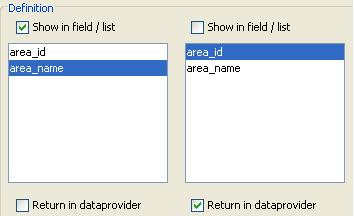
If you look at the attached picture you will see that the “areaname” has the checkbox “Show in field/list” marked, and the area_id has the checkbox “Return in dataprovider” marked.
This results in a valuelistObject that has two columns coming from table “areas”:
areaname(shown in the valuelist= display value)
area_id (this value goes back into the database = return value)

area1 > id 1
area2 > id 7
area3 > id15

Now if you attach this valuelist to a dataprovider “area_id” on your form, and suppose
the record you’re viewing has area_id 7, you will see the display value “area2”. If the user clicks on the valuelist , he will see area1/2/3.
choosing area3 will result in a return value of 15 going to the database.

Hope this helps.

Thanks. I do understand the part about displaying and returning values in the dataprovider. What I am asking about is the creation of the valuelistObject itself, and what columns it offers:

maarten:
This results in a valuelistObject that has two columns coming from table “areas”:
areaname(shown in the valuelist= display value)
area_id (this value goes back into the database = return value)

What did you do to get these particular columns in the valuelistObject; i.e., so that the columns come from table “areas”? The options in this dialog box are custom values, values from a database, and related values. I expected these to come from some combination of related values, but apparently this is not what you did. So I am indeed asking about the valuelist dialog (which you show in the picture), only I am
asking about the section above the part that you show – where you tell Servoy where/how to grab the values.

-Peter

choose DatabaseValues>All values from “crm”(servername) and areas(tablename)

Ok, that makes perfect sense. What was confusing me was that my assistant imported your tables into our existing database. So when we open up your forms and look at the valuelist dialog box, instead of “crm” it is set to our database. But-- and this is what is odd – no table is selected in the next pulldown menu on the right side! And it still shows a valuelistObject with columns from the area table! This makes absoutely no sense to me – I would have expected it to look the way yours does. Wouldn’t it need a table to be selected in order to know which columns to show?

thanks again,

Peter

This is a displaying bug Peter,
It should show the table name!

Sorry if this confused you.
Will have this fixed asap.

thanks,
Maarten.

That solves the mystery! Thanks Maarten.

-Peter