I keep getting the following “Database information inconsistency” error. The columns and tables indicated seems to be fine. The solution is working fine. I am on Version: 5.2.9 - build 1020, MySQL 5.1.
Description	Resource	Path	Location	Type
Column 'fcpadb->proceedings_defendants->defendant_citizenship_hq' appears in the DB table, but it is missing from the DB information file.	proceedings_defendants.dbi	/srms_resources/datasources/fcpadb	JSON file	Database information inconsistency
Column 'fcpadb->proceedings_defendants->defendant_citizenship_juris' appears in the DB table, but it is missing from the DB information file.	proceedings_defendants.dbi	/srms_resources/datasources/fcpadb	JSON file	Database information inconsistency
Column 'fcpadb->proceedings_defendants->defendant_individual_bln' appears in the DB table, but it is missing from the DB information file.	proceedings_defendants.dbi	/srms_resources/datasources/fcpadb	JSON file	Database information inconsistency
Missing database information file for table 'srmsdb_lut->countries_names_iso_31661' (table exists in the DB).	srms_resources		JSON file	Database information inconsistency
The servoy_log.txt file does not show any of these errors. ?
Any idea of what is going on? I am on developer and afraid to upload (put in production) until I fix these errors. They just showed up tonight. Bummer!
JC
what happens if you say on the Database node: “Synchronize with DB server information” ?
jcompagner:
what happens if you say on the Database node: “Synchronize with DB server information” ?
I also get the ‘Database information inconsistency’ errors.
do you then sync it?
do you create the DBI files for the missing tables?
jcompagner:
do you then sync it?
do you create the DBI files for the missing tables?
Yes, I select the database (fcpadb) and I did ‘Synchronize with DB server information.’ Still, same issue: I have issues with three columns of the proceedings_defendants table. There is no message for the other 20 columns. The other issue is with a table.
I do not quite understand the second question. Should I (manually) create the DBI files for the tables with the issues? And if, what’s the recipe for that?
JC
no with synchronize you get a wizard that allows you to make it in sync.
Just check that it creates the dbi files.
jcompagner:
no with synchronize you get a wizard that allows you to make it in sync.
Just check that it creates the dbi files.
I am not seeing the ‘wizard’ just this message:
[attachment=0]sync_db.JPG[/attachment]
Then, after I click ‘Finish’, something happens but it’s too fast to read before the process and progress bar ends theirs tasks.
Although I have these errors in the “Problems” of the Servoy’s perspective, the solution seems to be working fine. All of the CRUD functions in connection with the columns and tables with the issues are working fine.
If you want I can send you a copy of the solution. I am using the SmartDoc and The Browser Plugin, but you don’t need these installed to check the issue.
what happens if you select the warning in the problems view and then in the popupmenu use quickfix?
jcompagner:
what happens if you select the warning in the problems view and then in the popupmenu use quickfix?
It worked! Johan, thank you very much for such as rapid response. With Servoy there is always a resolution built in! Thanks. 
For the forum:
If this “Database information inconsistency” error ever happens to anyone.
- select the database server (with the table or column with the problem) and then select ‘Synchronize with DB server information’ from the popup menu. If it does not work, the try #2 below.
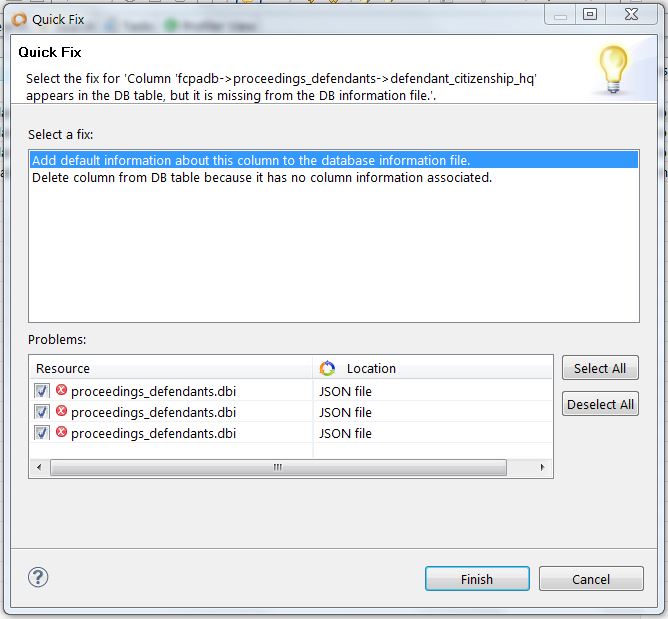
- select the warning in the problems view and then in the popup menu use quickfix. Make sure to select ‘Add default information about this column to the database information file.’
See image below:
[attachment=0]sync_db_problem_fix1.JPG[/attachment]
JC
For the forum:
If this “Database information inconsistency” error ever happens to anyone.
- select the database server (with the table or column with the problem) and then select ‘Synchronize with DB server information’ from the popup menu. If it does not work, the try #2 below.
- select the warning in the problems view and then in the popup menu use quickfix. Make sure to select ‘Add default information about this column to the database information file.’
The ‘Synchronize with DB server information’ is intended to synchronize at table level (missing/extra tables). Synchronization at column level is done via warning markers. In Servoy 6.1 we added a feature so that after ‘Synchronize with DB server information’ wizard is finished the quickfix wizard(s) for markers will be opened so that the steps to follow are more clear.