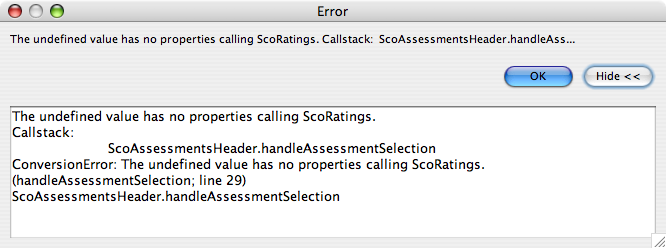
where forms.ScoRatingsAndHeader is based on table assessments and forms.ScoRatings is based on table ratings (relationship is 1:m between assessments and ratings)
forms.ScoRatingsAndHeader.elements.tabDetail.addTab(forms.ScoRatings, null, null, null, "#000000", "#BBCCEE", forms.ScoRatingsAndHeader.assessments_or_scored_with_ratings.forms.ScoRatings);
```The last argument is not a foundset if I read this correct...
As I understand it …removeAllTabs is just good housekeeping to ensure that where you are dynamically adding & removing Tab panels there are no conflicting Tabs left over from previous code.
Picked this up from Maarten B who showed it was possible to have a solution running on a single Main Form.
Thanks for replying. I found the problem! With no optional parameters the position of the parameters seems not so critical, BUT when using the optional parameter(s), it is.
A related tab panel perfectly works with that stmt:
The “only” difference is the insertion of another null value and therefor the relationship is (now correctly) at the 8th position!
I had quite many wrong statements which work without a problem. But corrected them all of course, now that I realized that actually there are wrong.
Best regards, Robert
IT2Be:
forms.ScoRatingsAndHeader.elements.tabDetail.addTab(forms.ScoRatings, null, null, null, "#000000", "#BBCCEE", forms.ScoRatingsAndHeader.assessments_or_scored_with_ratings.forms.ScoRatings);
```The last argument is not a foundset if I read this correct...
Sorry, don’t know what I read Yes, I also use the removeAllTabs, simply because it wouldn’t work without it.
Can you load a tab into a tabless tab without using removeAllTabs before the addTab stmt?
Best regards, Robert
PS: We also build our school admin and info system app with dynamically loading tabs into the main (top) forms structure, which is basically a 3 column structure. It’s built after iTunes (left column is the “menu” (dbTreeView), middle is a “selection” column and the right (wide) column contains the “detail”. Sometimes the detail is a forms, sometimes a list view. Sometimes the detail column is further divided into 2 columns.
I think loading forms into a basic structure is quite elegant and gives much more flexibility - also for applying size changes.
grahamg:
Good to hear the problem was solved.
As I understand it …removeAllTabs is just good housekeeping to ensure that where you are dynamically adding & removing Tab panels there are no conflicting Tabs left over from previous code.
Picked this up from Maarten B who showed it was possible to have a solution running on a single Main Form.
The sort method works on the foundset, but does not return the foundset.
So, the last argument to addTab is actually null.
You will have to sort before or after the call to addTab.
Thanks for the hint - I just realized I have to look for the return value of sort, which is void, so as you say, the argument is null, therefor the m-side form (tabless tab panel) not shown.
Thanks for your help, regards, Robert
rgansevles:
Robert,
The sort method works on the foundset, but does not return the foundset.
So, the last argument to addTab is actually null.
You will have to sort before or after the call to addTab.