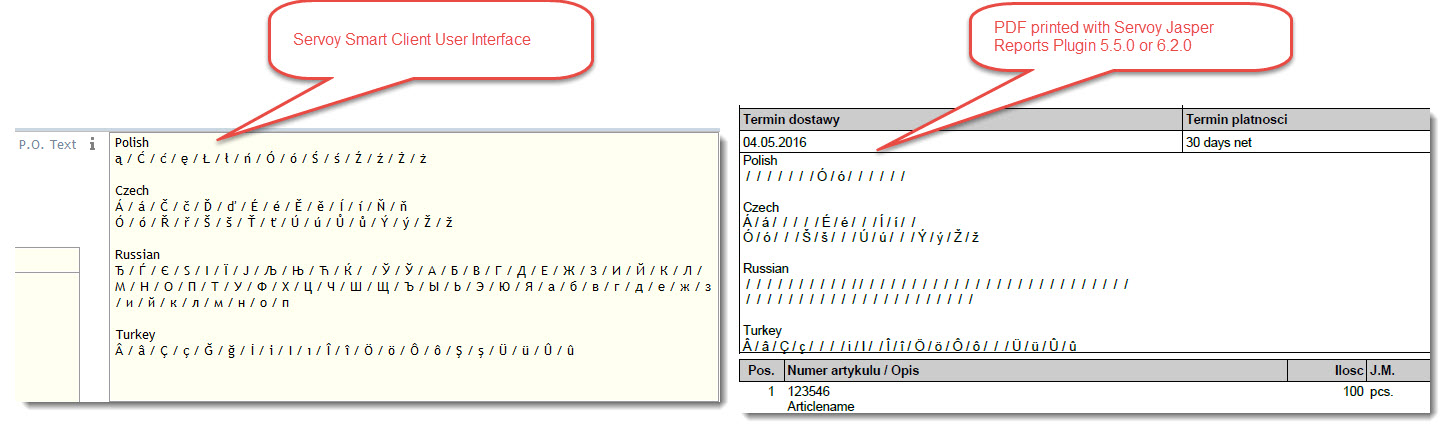
The alphabets of east european countries have a lot of diacritical characters or even completely different characters (Russian).
Polish: ą / Ć / ć / ę / Ł / ł / ń / Ó / ó / Ś / ś / Ź / ź / Ż / ż
Czech: Á / á / Č / č / Ď / ď / É / é / Ě / ě / Í / í / Ň / ň / Ó / ó / Ř / ř / Š / š / Ť / ť / Ú / ú / Ů / ů / Ý / ý / Ž / ž
Russian: Ђ / Ѓ / Є / Ѕ / І / Ї / Ј / Љ / Њ / Ћ / Ќ / / Ў / Ў / А / Б / В / Г / Д / Е / Ж / З / И / Й / К / Л / М / Н / О / П / Т / У / Ф / Х / Ц / Ч / Ш / Щ / Ъ / Ы / Ь / Э / Ю / Я / а / б / в / г / д / е / ж / з / и / й / к / л / м / н / о / п
They are used widespread in first names, surnames, company names, addresses, article descriptions etc.
We use iReport 5.5 to create our printable forms and reports.
Inside iReport, those characters print fine in the preview.
However when the Servoy Jasper Report Plugin 5.5.0 prints them in the running application to a PDF file, a lot of those special characters will not show.
Russian characters will even not print at all. Same is true for Chinese signs like 艾普瑟轮.
We tried also to use the latest version Servoy Jasper Report Plugin 6.2.0 which did not work either.
We use Servoy 7.4.5 on the server and postgreSQL with UTF-8 coding.
The attached picture shows which characters will not print.
Could someone who uses the Servoy JasperReports Plugin and is printing a text field with it, invest a minute and try to print the following characters?
I would like to know if others have the same problem.
I found out meanwhile that for us, characters below UTF-codes U+00FF will print fine, but not UTF-codes after, details here in JIRA:
Polish ą / Ć / ć / ę / Ł / ł / ń / Ó / ó / Ś / ś / Ź / ź / Ż / ż
Czech Á / á / Č / č / Ď / ď / É / é / Ě / ě / Í / í / Ň / ň Ó / ó / Ř / ř / Š / š / Ť / ť / Ú / ú / Ů / ů / Ý / ý / Ž / ž
Russian Ђ / Ѓ / Є / Ѕ / І / Ї / Ј / Љ / Њ / Ћ / Ќ / / Ў / Ў / А / Б / В / Г / Д / Е / Ж / З / И / Й / К / Л / М / Н / О / П / Т / У / Ф / Х / Ц / Ч / Ш / Щ / Ъ / Ы / Ь / Э / Ю / Я / а / б / в / г / д / е / ж / з / и / й / к / л / м / н / о / п
Turkey  / â / Ç / ç / Ğ / ğ / İ / i / I / ı / Î / î / Ö / ö / Ô / ô / Ş / ş / Ü / ü / Û / û
China / 艾普瑟轮 /
Is nobody else using JasperReports to print output in countries like Poland, Czechia, Slowakia, Turkey, Russia or China?
Because if there is anybody, he/she would have faced the same problem as we do.
Hooray, we got a solution from the Servoy Team:
So far we created a PDF right away with plugins.jasperPluginRMI.runReport(), and that leads to the missing character issue.
But when calling the JasperViewer (by submitting the outputType parameter plugins.jasperPluginRMI.OUTPUT_FORMAT.VIEW), the diacritical characters will show up fine (except chinese characters, but that needs another font I guess).
However when you try to save the view to a PDF file, the characters are gone again. That can be solved with the workaround of printing to a previously installed PDF printer.
we create a font_extension.jar in jasperReport. IN jasperreport you can import your fonts (and also say embed in pdf!)
than that font-extension.jar needs to be included with several other jars, into the jnlp (for smart-client)
Hi Harjo,
I think that is what Gabor told us to do on our ticket Jira, and we followed the instructions there, but could not get another result (see ticket).
Ok, Gary got it now:
Turned out the problem was the PDF Encoding setting for the Font that we used on the report. Before exporting the Font as a jar and installing it in the “servoy_jasperreports” plugin folder, we needed to set the PDF Encoding to “Identity-H”.
We found the solution to the problem in this article: http://jasperstarter.cenote.de/de/unicode-pdf-export.html