Without changing anything on my server today, I am suddenly getting and unable to launch error like this:
/Users/davidpearce/Library/Caches/Java/cache/6.0/62/6e757cbe-7ef83d6f-1.3-028-.idx
security: Have 1 common certificates after processing http://www.drcoop.co.uk:80/plugins/it2be-runtime/server-runtime.jar
security: Istrusted: http://www.drcoop.co.uk:80/servoy-client/plugins/it2be-tools.jar.jnlp false
network: Created version ID: 0+
network: Created version ID: 1.6
network: Created version ID: 1.6.0.20
network: Created version ID: 1.6
security: Validate the certificate chain using CertPath API
security: Obtain certificate collection in Root CA certificate store
security: Obtain certificate collection in Root CA certificate store
security: Obtain certificate collection in Root CA certificate store
security: jpicertstore.cert.getkeystore
security: No timestamping info available
security: Cannot find jurisdiction list file
security: Checking if certificate is in Deployment permanent certificate store
security: Start checking revocation for extension installation for this certificate
security: The CRL support is enabled
security: Trapman Marcellinus
security: ObjectId: 2.5.29.31 Criticality=false
CRLDistributionPoints [
  [DistributionPoint:
     [URIName: http://crl.globalsign.net/ObjectSign.crl]
]]

security: GlobalSign ObjectSign CA
security: ObjectId: 2.5.29.31 Criticality=false
CRLDistributionPoints [
  [DistributionPoint:
     [URIName: http://crl.globalsign.net/primobject.crl]
]]

security: GlobalSign Primary Object Publishing CA
security: ObjectId: 2.5.29.31 Criticality=false
CRLDistributionPoints [
  [DistributionPoint:
     [URIName: http://crl.globalsign.net/Root.crl]
]]

security: This certificate does not have CRL extension
security: Use CRL setting from certificate
security: The OCSP support is enabled
security: Trapman Marcellinus
security: ObjectId: 1.3.6.1.5.5.7.1.1 Criticality=false
AuthorityInfoAccess [
  [
   accessMethod: 1.3.6.1.5.5.7.48.2
   accessLocation: URIName: http://secure.globalsign.net/cacert/ObjectSign.crt]
]

security: GlobalSign ObjectSign CA
security: ObjectId: 1.3.6.1.5.5.7.1.1 Criticality=false
AuthorityInfoAccess [
  [
   accessMethod: 1.3.6.1.5.5.7.48.2
   accessLocation: URIName: http://secure.globalsign.net/cacert/PrimObject.crt]
]

security: This certificate does not have AIA extension
security: This certificate does not have AIA extension
security: Use OCSP setting from certificate
network: Connecting http://crl.globalsign.net/ObjectSign.crl with proxy=DIRECT
network: Connecting socket://crl.globalsign.net:80 with proxy=DIRECT
security: PKIX path validation failed: java.security.cert.CertPathValidatorException: Cannot find the location of the OCSP Responder
network: Connecting socket://127.0.0.1:49218 with proxy=DIRECT
Is this an issue with the certificate or something local.
com.sun.deploy.net.JARSigningException: Could not verify signing in resource: (http://69.70.227.26:8080/plugins/it2be-calendar/migcalendar.jar, 1277822992000)
	at com.sun.deploy.cache.CacheEntry$9.run(CacheEntry.java:1441)
	at java.security.AccessController.doPrivileged(Native Method)
	at com.sun.deploy.cache.CacheEntry.writeFileToDisk(CacheEntry.java:1345)
	at com.sun.deploy.cache.Cache.downloadResourceToTempFile(Cache.java:551)
	at com.sun.deploy.cache.Cache.downloadResourceToCache(Cache.java:484)
	at com.sun.deploy.net.DownloadEngine.actionDownload(DownloadEngine.java:1322)
	at com.sun.deploy.net.DownloadEngine.getCacheEntry(DownloadEngine.java:1487)
	at com.sun.deploy.net.DownloadEngine.getCacheEntry(DownloadEngine.java:1465)
	at com.sun.deploy.net.DownloadEngine.getResourceCacheEntry(DownloadEngine.java:1568)
	at com.sun.deploy.net.DownloadEngine.getResourceCacheEntry(DownloadEngine.java:1496)
	at com.sun.deploy.net.DownloadEngine.getResource(DownloadEngine.java:217)
	at com.sun.javaws.LaunchDownload.downloadJarFiles(LaunchDownload.java:920)
	at com.sun.javaws.LaunchDownload.downloadEagerorAll(LaunchDownload.java:803)
	at com.sun.javaws.Launcher.downloadResources(Launcher.java:1362)
	at com.sun.javaws.Launcher.prepareLaunchFile(Launcher.java:841)
	at com.sun.javaws.Launcher.prepareToLaunch(Launcher.java:309)
	at com.sun.javaws.Launcher.prepareToLaunch(Launcher.java:186)
	at com.sun.javaws.Launcher.launch(Launcher.java:107)
	at com.sun.javaws.Main.launchApp(Main.java:405)
	at com.sun.javaws.Main.continueInSecureThread(Main.java:252)
	at com.sun.javaws.Main$1.run(Main.java:111)
	at java.lang.Thread.run(Thread.java:637)
Marcel has just confirmed that this is an external authentication server issue.
Apparently a verizon server in Belgium has been down for 4-5 hours.
I can confirm that it now appears to have been fixed.
It is interesting in terms of redundancy that this Java security issue has essentially added another layer of uncertainty to all of our apps and operations, by making them contingent on a second independent server!
chico:
why is the man always trying to put us down?
I am sorry, maybe it is me but I can not laugh over this (certainly not now).
It cost my clients a lot of irritation and certainly my nerves. If I could have done anything to prevent or avoid it I would have done so.
Marcel… I hope you didn’t feel that was directed at you. It wasn’t. I understand that as a smaller software company, for us to have a chance, we have to use a lot of 3rd party and/or open source technology. The occasional blip that is out of our control is something we’ve been living with since day one. Ultimately, our customers will blame us, when in truth, it was someone up the chain.
This Java change has caused 2 days of pain… hopefully our customers will understand. My dig was aimed at the Java people. And I have to try to use humor to help me make it through days like this.
When there already was a connection it should continue working.
The certificate has to be validated though.
I am (still) in the process of finding out how things work but different CA’s have different stories (at least when it comes down to the java certs)…
Remember: the certificate should be for our convenience and not irritation. It should assure you (or your clients) that the components used come from a developer that really exists and can be trusted.
I fail to understand why a certificate root that is already in the Java cacerts needs internet access to validate child certificates.
A certificate root if part of the java cacerts has already been certified by SUN (or Oracle now , so there"s no need to validate it each time the user connects. A certificate chain cannot be created if one of the certificate in the chain is invalid!
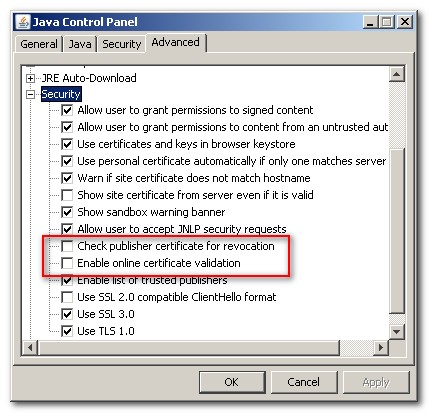
One thing that could stop this madness would be to uncheck 2 options in the Java control panel:
– Check publisher certificate for revocation
– Enable online certificate validation (OCSP)
My own system being in French, I could only find and older java panel to show you these options, but make sure they are NOT checked.
[attachment=0]certificate-error.jpg[/attachment]
Then you will never again have these kind of troubles.
ptalbot:
I fail to understand why a certificate root that is already in the Java cacerts needs internet access to validate child certificates.
A certificate root if part of the java cacerts has already been certified by SUN (or Oracle now , so there"s no need to validate it each time the user connects. A certificate chain cannot be created if one of the certificate in the chain is invalid!
I agree.
Today I learned it can have to do with early versions of Windows 7 and Vista that don’t have a ‘current’ crypto32.dll with these root certificates.
This is the devil as I understand (not from my own CA but another one): - Unless the Java client/JRE (beyond our control) treats the inability to get either an OCSP response OR a current CRL as invalid, then there should be no issue.
I would have checked the “Enable list of trusted publishers”, but the “Enable blacklist revocation check” unchecked.
Basically everything that unecessarilly connects third parties to validate something that is already validate would have caused the problem, but using the list of trusted publishers is the list of the already accepted certificates, so I hope that it is not revalidating this on the internet.
I will check for the optimal configuration of these options and get back to you.
Those security settings are going way too far these days!
We had the exact same issue with the it2be plugins directly from the beginning, within a company that has PC’s without direct internet access. (only access by a proxy, but java had to be on direct connection, for other issues)
the only thing that get us going was to use the new version of the signtester.jar and unsign everything and resign again, with or own (self signed) certificate.
Somehow the certificates of IT2BE forces you to have a real internet connection, we made a ticket back than.