This is for sharing topics I learned which might be interesting for others.
Today I stumbled over an interesting site that lists all UTF-symbols, which can be used like characters when using UTF coding in the own database.
That might be an alternative to showing PNG-icons in some cases, which need much more space than a single UTF symbol. Examples:
It is possible to just copy-paste the symbols from there, like ❏:cross_mark:✞:check_mark:⋃◔
That w3schools offers also a huge range of tutorials, e.g. for JavaScript, SQL, AngularJS.
Example for JS object tutorial:
In https://forum.servoy.com/viewtopic.php?f=22&t=21438 Marc showed how to use a dataset.
I wrote some sample code for myself about how to use it as temporary data storage at runtime, without any associated database table.
It would not be necessary to put 5 empty rows into the dataset in the beginning, 0 would be fine too, that’s just an example.
function exampleOfJSDataSet(event) {

	var
		/** @type {JSDataSet<client_id:UUID, client_name:String>} */
		myDs = databaseManager.createEmptyDataSet(5, ['client_id','client_name']),
		i = 1;

	myDs.addRow([application.getUUID(), "Meier"]);
	myDs.addRow([application.getUUID(), "Müller"]);
	myDs.addRow([application.getUUID(), "Schulze"]);

	for (i = 1; i <= myDs.getMaxRowIndex(); i++) {

		myDs.rowIndex = i;

		application.output(i + " " + myDs.client_id + " " + myDs.client_name);
	}
}
The result is this list:
1
2
3
4
5
6 926C6E1F-B64D-4A48-8309-D29768F2E546 Meier
7 EE523581-A868-4136-B0C1-98F9A8F71B48 Müller
8 7E0075B6-52BC-44D0-8F4A-464F77A4F372 Schulze
There are important remarks in the online-help of createDataSource, that you can get when typing myDs.createDataSource into a JS-file and then CTRL+space:
A temporary datasource cannot be removed because once created there may always be forms or relations that refer to it. When the client exits, all datasources used by that client are removed automatically. Most resources used by the datasource can be released by deleting all records: dataset.removeRow(-1) or databaseManager.getFoundSet(datasource).deleteAllRecords()
I use an own todo list table where I had two problems:
[attachment=0]todo_list.png[/attachment]
a) After using the ±button to add a line directly under an existing todo, the table changed in a way that the new record was shown at the top of the table, so the complete visible section was moved which gave a bad UX.
b) After clicking the done checkbox, which sorts the done todo to the end of the list, I wanted to stay on the next “not done” line, without any movement of the visible line section, quite similar to (a).
I now figured out how to do this, an insert of foundset.setSelectedIndex(1) did it.
(The td_priority is the number in the P. column, which I use to sort the todos.)
We put small i-buttons in our forms that show context-specific information. Until now I always created a form function for the onAction event to call a getDialog() function to show the information.
But that is not necessary when coding a second function that just calls getDialog, and has an event parameter as first parameter.
(getDialog() can not be called directly in the onAction as Servoy wants to put the event as first parameter)
A slight disadvantage is that a Ctrl-H-search of “formGetDialog” will not find that call any more, however the string for the parameter sDialogName can be found.
Sure I could put the event parameter already in the main getDialog(), but I want to avoid to change all existing calls now.
For Servoy newbies: after double clicking in the onAction event to set the function, it is not necessary to search it in the list. Typing of “formGet” will be sufficient and Servoy shows the function automatically.
In future, when I create a new generic function that could be called by different buttons, I will always put an event as first parameter for such situations. In case I don’t have an event I still can use null as value for the event.
[attachment=0]formGetDialog.png[/attachment]
/**
 * Used to call a dialog directly in the onAction event
 *
 * @param {JSEvent} event
 * @param {String} sDialogName
 * @public
 */
function formGetDialog(event, sDialogName) {

	getDialog(sDialogName);
}

...
function getDialog(sDialogName) {
...
}
Although form development with Servoy is very fast, the rich UI of its developer might intimidate a customer that you invited to develop a form prototype together on your screen or with skype.
I once tried balsamiq, but I remember it needed more time than developing right away with Servoy.
That impression I didn’t have when I tried pidoco today, it really has a fast UI/UX and I could start in a minute just by trying it.
Pricing is moderate with just 10 EUR/12 USD per month.
Until now I used an empty line to group listbox values.
But a “-” (minus sign) as display value is better.
Because it creates a full separating line, and the mouse cursor jumps over it automatically, thus creating a better UX.
Linux and Unix users have diff to find differences between two (source code) files.
A nice online version for a quick and comfortable diff view can be found at https://www.diffchecker.com
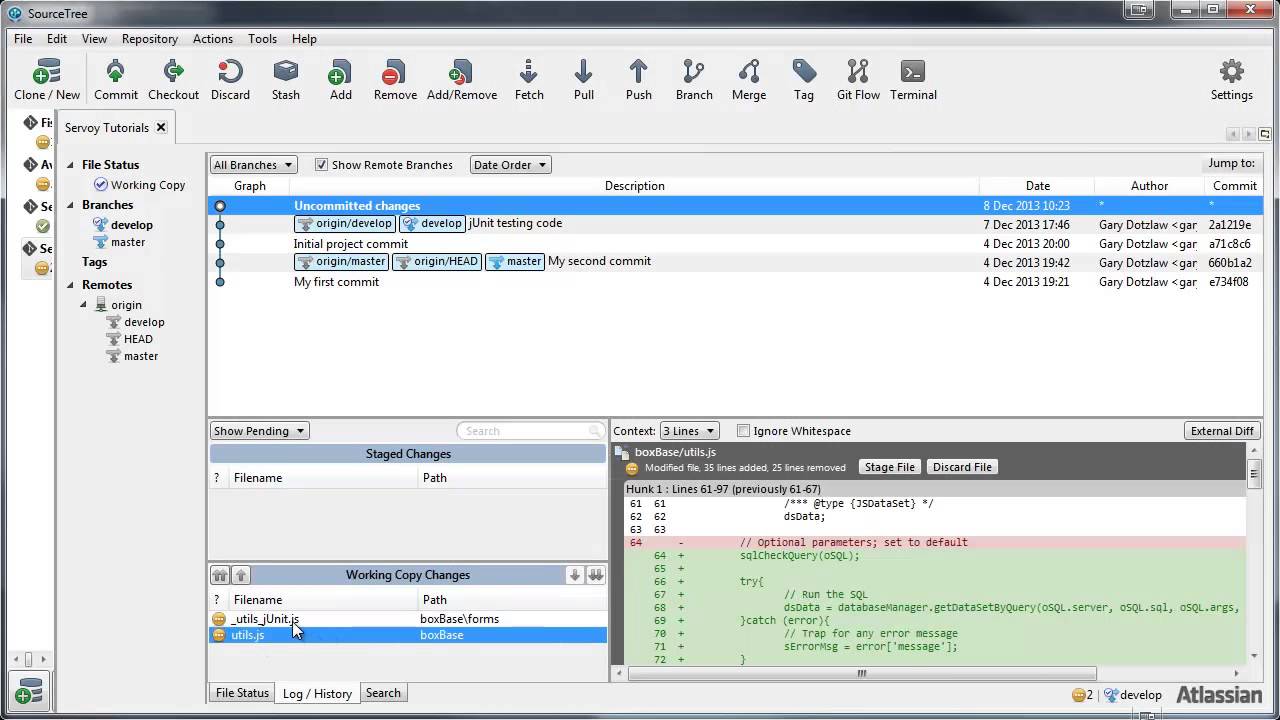
BTW, when using Atlassian SourceTree as source code controller in a distributed development environment, one gets diff views for all changed files automatically with each commit.
In this online tutorial that can be seen in the right lower corner (red and green lines) at around 7:00 :
Whenever possible I use boolean variables, as it creates nice code when they are involved.
The reason is you can just write
if (_bBooleanVariable) { ...
and you do not have to compare it to another value, as it is already true or false, which is most elegant.
Today I created a form variable
var _bMyProjectTemplates = true;
as the data provider for a checkbox that is intended to toggle a filter between records of the current user and all records.
(The underscore is our default notation for form variables, to prevent to shadow any field names.)
The problem was that the initial true value did not render the checkbox as checked.
So in this case, I had to use an integer and switched the code to
var _iMyProjectTemplates = 1;
While writing this, I had the feeling that a checkbox will always turn a boolean var into an integer, as JavaScript is not strongly typed, and checked that with an application.output in the onDataChange - and indeed, that is the case, so no wonder this was not working: a checkbox converts a boolean var silently into an integer, without complaining …
Fortunately one can still write
if (_iMyProjectTemplates) {
...
}
as a 1 evaluates to true and a 0 to false in JavaScript.
I wanted to clean up the data structure of a table regarding fields that are not used any more.
So I needed to lookup all code with STRG-H-search for field names that I guessed are deprecated, for example “pe_bookable”.
That found a lot of lines where another field “pe_bookable_by” showed up.
But I could not google a regex like “Find string1 but not string2”.
Good news is I stumbled over a nice regex testing tool, where I could stuff all lines from the first search, and then highlight those without pe_bookable_by, as that regex is well documented in the web:
^((?!pe_bookable_by).)*$
The tool furthermore nicely explains the meaning of every single expression in the complete regex, just by holding the mouse over the symbols:
In Servoy Developer, Ctrl+Shift-L is the command I use the most, as an alternative to search objects in the Solution Explorer.
When I wondered today how to define keyboard shortcuts in Eclipse, I found out that pressing Ctrl+Shift-L twice shows the shortcuts, and a third Ctrl+Shift-L will show the shortcut configurator.
To get an overview about the current key assignments, it is possible to sort the binding column by header mouseclick. Conflicts (double assignments) will be shown.
Now I do not longer have to press three keys to open the js of a form, as I decided F5 is best for this so much needed function.
And F8 starts the client now, also replacing a three-key-kombination I could never keep in mind…
Regarding the business partner table form of our application, I just asked myself:
Why should that table initially load 200 records onShow, thus stressing the network, when those records are not really relevant for a user as they have about 7.000 business partners.
Why not wait until the user searches a business partner name or a city name?
I guess that’s the intention of the form property namedFoundSet = -empty-, as that prevents the inital loading of the first 200 records.
Now comes the hard part, to communicate this to some hundred users before the next update, to prevent a flood of emails to the 1st level helpdesk that all business partners are gone…
Luckily we have already an “All” button that shows all records again.
And I will also show an information about this new behaviour in onShow(firstShow) that the user can suppress with a checkbox, so the helpdesk should be fine.
That’s interesting and should speed up things even more.
I think I will try emptyFoundset also on further detail forms.
An option would then be to just load one single record to a detail form, in order to not show a complete blank detail form on firstShow.
It could be the last record a user used on last login.
That record PK could be stored on logout in a tiny help table with userID and tableName and a composite index of both, should be fast.
Preventing table sort
Table sort by mouseclick on a header is a powerful feature in table forms (second mouseclick on a second header wile holding shift-key enables a second sort).
However in some tables it can confuse users, e.g. in a typical order lines table, when the user accidentally hits a table header and suddenly all order lines have a new order.
A simple way to prevent this is to code a generic scopes.utils.doNothing() function with empty body.
Then select all headers with the lasso and hook their onAction event up to doNothing(), that’s it.
showClick and showFocus need to be disabled on those headers to still look nice, though.
(Setting enable to false will not help, as it renders the header text to a non-wanted font.)
“Do nothing and everything is done” was already recommended by Lao Tze:
BTW, the table sort by header mouseclick does not work on non-stored calculated fields. In those cases a function can be used on the onAction() of that table field header, which will sort explicitly with foundset.sort(“my_sort_field”). But my_sort_field can not be the calculated field, it must be something else. If everything fails a directSQL with sorting to stuff the foundset will possibly help, but that is certainly a bit much in most cases.
JavaScript does not distinguish between integers and numbers - but Servoy does…
JavaScript has just one number type: number - that’s it.
Recently I needed a form variable to hold the total of some table lines.
However the total was always without decimals, until I figured out why.
In such cases, it is important to define the form var properly with " = 0.0", Servoy will then add another variableType, as can be seen here:
/**
 * @type {Number}
 * @properties={typeid:35,uuid:"DD54DF8C-D5D3-4D98-9A8E-4852DE6EE91F",variableType:4}
 */
var _iTotalOrderValue = 0;  // will not work properly, decimals will get cut!

/**
 * @type {Number}
 * @properties={typeid:35,uuid:"6A81AD82-FDB3-4495-A679-7ECF296FB33F",variableType:8}
 */
var _nTotalOrderValue = 0.0;
To hold this in mind, I will now define pure integers with prefix _i in front, and real numbers with _n in front.
I am really amazed how good both JIRA packages work together under one hood, and for startups like us they cost nearly nothing.
So it is no problem for example to add issues from both packages into one sprint.
The advantage of JIRA Service Desk is that you can create as many “reporter users” from your customer users as you want, without extra charge.
And as it is so widespread used, one can quickly google answers to any upcoming questions regarding configuration.
Additionally, the JIRA support is really fast and responsive.
We also started Confluence to create a structured knowledge base for everything in our company, like coding guidelines, marketing strategy etc., it also works like a charm.
Those tools are clearly a recommendation for everyone who works with a team, regardless of size. We pay now just 30$/month for all three.
Modal window dialogs are handy, e.g. to put in “small” records which belong to larger ones.
When making them moveable, to my knowledge you can not prevent that on the right upper side the red close button in form of a X appears (at least on Windows systems).
Today I learned that you always have to take into account that users will not press either your Save or Cancel buttons, but sometimes move their mouse to the much smaller X button that is not that easy to reach.
In my case that meant that code that I expected to run did not run, and some form variables where not cleared, which should have been the task of the cancel button.
A non wanted side effect in new records was the result. That could be solved by always calling the clearFormVariables()-function before creating a new record.
In case someone knows about getting rid of that X/Close-button, or if there is a method that fires when the user clicks it, I would be happy to hear about that.
You have two options for the dialog close. (To my knowledge it’s not possible to get rid of the button so you’ll have to handle it)
you use the dialog form onHide that gets called when the x button is clicked
on the function that creates the dialog, you set a flag on the dialog form and you change that flag if ok/cancel are clicked. if the flag was not changed you know it was the X button
var dialog = forms.dialog;
dialog.flag = -1;

var w = application.createWindow('Dialog', JSWindow.MODAL_DIALOG);
w.show(dialog);

if (dialog.flag == -1)
	// X button
else if (dialog.flag == 0)
	// cancel button
else if if (dialog.flag == 1)
	// ok button
Another approach would be to simply “ignore” the X by letting the onHide method return false if no button was clicked. When a button is clicked, you could set a variable buttonClicked = true. In the onHide method you could then do this
if (buttonClicked === true) {
   return true;
}
return false;
Many people also ask the user whether he wants to cancel or save
if (buttonClicked !== true) {
   //ask to save or cancel
}
return true;
 ✞:check_mark:⋃◔