normally (i think you just encouter a bug that the repository thinks it has new files) but normally
you first have to do an update and then resolve conflicts, thinks like revert/overwrite and update (get the repo version) or mark as resolved to say now i have a file that is in sync with the repository
only then you are able to commit, so you have to be up to date with the latest from the repo
The thing is at your place you should be up to date. Because there shouldnt be changes so that is something we should look at.
What you also can do is use SVN or CVS as a versioning/repository system.
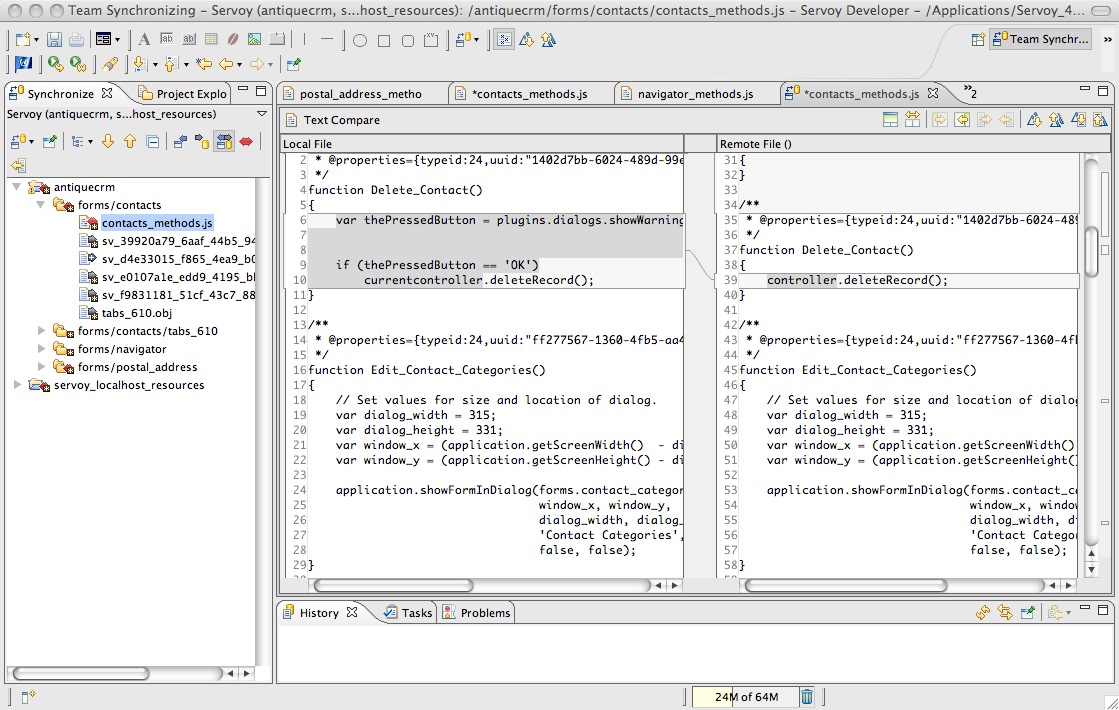
You haven’t answered my question about the ‘Text Compare’ window yet, so please let me know what you think about it. I’ve included a screen shot of the window below, as an example of what I’m talking about.
[attachment=0]servoy1.jpg[/attachment]
The screen shot above shows my contacts_methods.js file in the Text Compare window. There is a difference between the two delete_contact methods. (The one in my local workspace asks if the user wants to delete before deleting, while the one on the repository just deletes without asking any questions.)
As I’ve said before, it doesn’t seem possible to copy changes from my local files to the repository. You can see the buttons that are used to copy changes at the top of the window. You should also be able to see that both of the buttons that copy from left to right are disabled. Is it possible to enable these buttons, as I really do need to use them.
in the ‘Text Compare’ you should make your copy (the left file) to be what you want to commit :
so for this, you can copy from the right window changes that were added by other users or
keep the code, if you consider it the right one.
after that, you mark the file as merged, and commit it
Big thanks for that one, it has solved all my problems. I just followed your instructions and they’ve enabled me to commit the whole solution without any problems or conflicts.
I’ve seen some issues about Commit & Synchronize and we (also) lost work yesterday.
In developer new forms were added including methods
These changes were commited to the repository (only the new created forms)
Because on other developer changes were made also in same solution, an Update was done.
And unfortunately all changes were gone. The forms were in the repository, but empty (so without contents)
And also formmethods were lost
Till now this problem has only been noticed on a MAC developer. I asked my colleague to replace his MAC by Windows PC, but he wasn’t happy with that
When doing the following steps, the work made was saved:
After commit, restart the application server
Also restart developer
Then do a Synchronize
Only in this situation Synchronize sees the committed changes.
Is this normal behavior? On my Windows PC I’ve never seen that after a commit that I had to restart the AS.
Or was this just an incident? Anyone still having same kind of problems with 4.1.4?
Computer 1 makes changes and commit them to the repository
Computer 2 does Synchronize and doesn’t get to see the changes made by Computer 1
Computer 2 closes developer and restarts developer
Computer 2 does Synchronize and now the differences with the repository are correcly shown.
So the point is not to restart the AS, but to restart the developer.
after commit your changes should be saved in the repository, there is no need for any restart.
can you check the log files for errors ?
regards,
Gabi
martinh:
I’ve seen some issues about Commit & Synchronize and we (also) lost work yesterday.
In developer new forms were added including methods
These changes were commited to the repository (only the new created forms)
Because on other developer changes were made also in same solution, an Update was done.
And unfortunately all changes were gone. The forms were in the repository, but empty (so without contents)
And also formmethods were lost
Till now this problem has only been noticed on a MAC developer. I asked my colleague to replace his MAC by Windows PC, but he wasn’t happy with that
When doing the following steps, the work made was saved:
After commit, restart the application server
Also restart developer
Then do a Synchronize
Only in this situation Synchronize sees the committed changes.
Is this normal behavior? On my Windows PC I’ve never seen that after a commit that I had to restart the AS.
Or was this just an incident? Anyone still having same kind of problems with 4.1.4?
martinh:
I just noticed the following:
Computer 1 makes changes and commit them to the repository
Computer 2 does Synchronize and doesn’t get to see the changes made by Computer 1
Computer 2 closes developer and restarts developer
Computer 2 does Synchronize and now the differences with the repository are correcly shown.
It looks like a bad repository setup, i have already seen that behaviour after migrating from servoy 3.5 Multidev to 4.1 because the setup for a dev group is quiet different
on which machine is located the repository for your synchronisation?
what is the servoy_repository connection string on machine 1 and Machine 2?
What i understood is that your have two servoy developper with the servoy_repository string //yourrepsql2K5server/yourservoyrepositorydb
In your scenario the servoy dev team server is missing ?
The dev team server must be the only one writing to the repository via your dev checkout, synchronize etc.
your two servoy dev must have their own default sybase repository that they’ll never use because they will checkout, synchronize etc… via the dev team servoy server and not with their localhost repository.
In the servoy dev servoy.properties file your can put servoy.application_server.startRepositoryAsTeamProvider=false to be sure that you’re not synchronizing with yourself
both developers have a repository_server connecting to one central repository database
No way that we use local repositories
The local repository is in fact the workspace
We use commit/synchronize/update to update the local workspaces.
As you can see in one of my previous replies, that synchronize is not working correctly if you don’t restart the developer.
martinh:
both developers have a repository_server connecting to one central repository database
The problem is here
martinh:
No way that we use local repositories
Why ?
martinh:
The local repository is in fact the workspace
Only when you start the clients from developper
martinh:
We use commit/synchronize/update to update the local workspaces.
In your case with multi developper you must not
martinh:
As you can see in one of my previous replies, that synchronize is not working correctly if you don’t restart the developer.
Because your local team provider read the db repository when it start (or restart) and it doesn’t see that other team server (your other machine ) has modified the objetcts in the db
the developers should connect to the same servoy team server, they
should use the same address/ip when sharing.
I guess they use now localhost ? nomatter they have the same repository
set for team, if they use localhost they actullay using 2 diff team servers (the internal team server) that writtes
to the same db, and this can cause the problems you have.
After reading your remarks I don’t know anymore what is the correct way to use Teamdevelopment
As far as I always understood I could work and develop locally and when I tested my application and all seems to work OK, I could commit the changes to the central repository.
Now you are talking about an extra database for local repository which I thought that was my workspace.
When changing servoy.application_server.startRepositoryAsTeamProvider to false, I get the following errormessage
Application server does not accept client connections.
I’ve read the chapter about Teamsharing in the Servoy 4 Developer Users Guide and it isn’t clear to me what is wrong.
Is there somewhere a clear overview who to setup a Team development?
Because in case of a local repository, how can this be synchronized with the central repository?
I don’t know if there’s a clear documentation, i’ll just explain how i’m working.
One server with SQL2K5 dbs and Servoy server installed with Startasteamprovider=true
SQL2K5 db on this server : all the db that you can have after a classical install of servoy repository, udm etc…( i don’t use sybase in this server)
and of course my applications db
two or more servoy dev with the same servoy.properties file except:
servoy_repository linked to my local sybase db (to be sure that i can’t alter the team repository data)
Startasteamprovider=false
Servoy Developper
-When you start your developper for the first time no silution appear in the workspace.
-Then to check out the first time the solution from the team server, you put your sql2K5 or team provider server name, user and password
You’ll then have a local eclipse based copy of your solution(object etc.) in your local workspace (and not in your local repository)
Each dev synchronizing with the same team provider server, you are sure that he knows every dev changes made by synchronize process.
I’m not sure if it’s the most academic setup but mine is ok
Hope this can help you
you can even remove the connection string for the repository db
from the property file on the developers instalations, as that is
only used if they want to run theier own team server , and here
it is not the case, as they use an external server.
Just keep in mind that, unlike SVN and others, with Servoy teamserver you are always committing to the same release. No way to rollback to your previous commit in that same release.
If you want to make a new release you need to create one yourself in the repository via the servoy-admin page.